Location Tab
Developer guide for the Location panel shared across Assembly, Component, and Kit detail pages. Left sidebar with location history cards, right panel with Google Map.
1. Screenshot
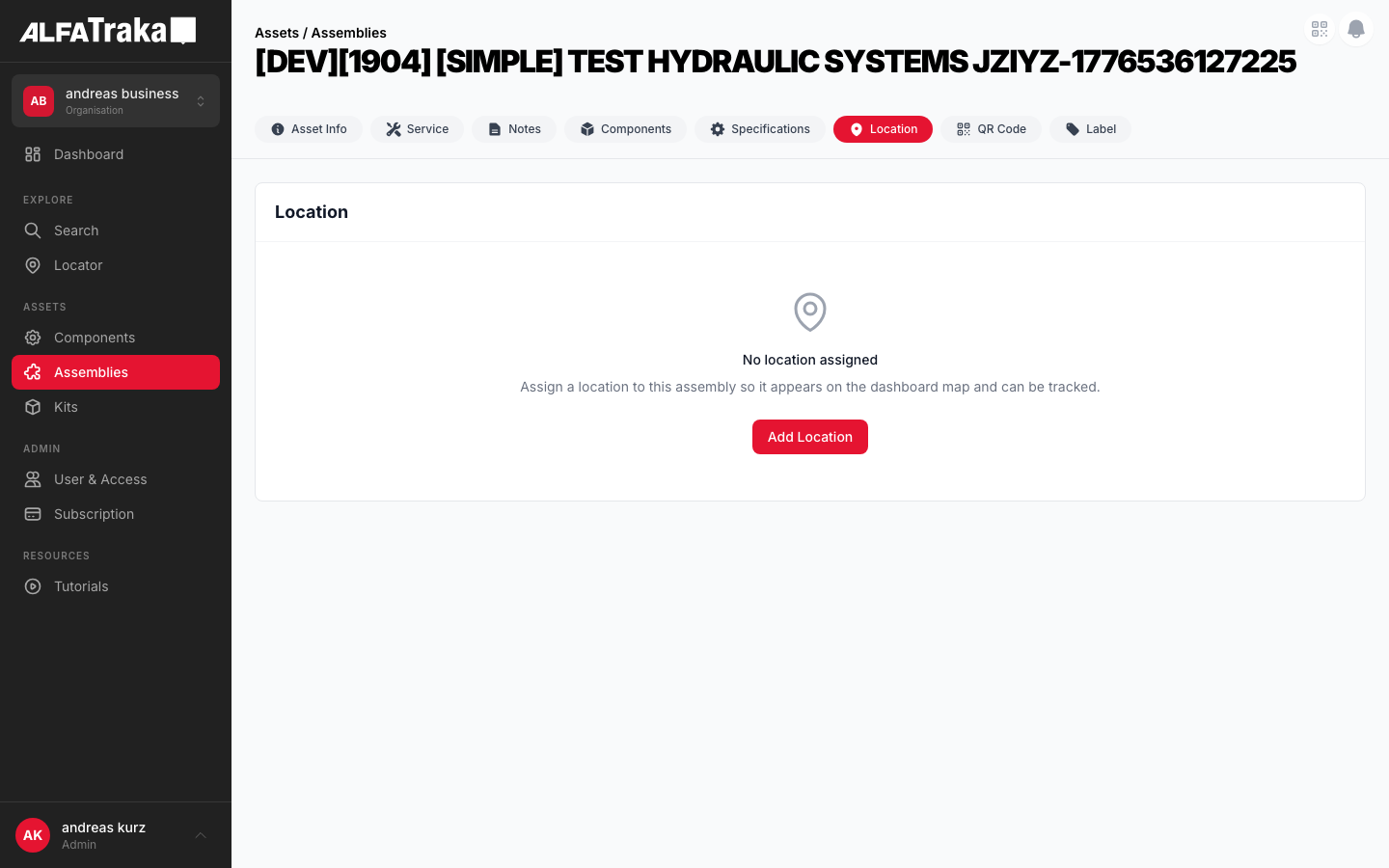
Live screenshot from dev environment (Location tab with sidebar + map)
2. Component Tree
Assembly/Component/Kit [id].tsx         pages/{assemblies,components,kits}/[id].tsx
 |- PageHeader
 |- AssetDetailTabs
 |   '- tab navigation (Info | Specs | ... | Location)
 '- Location                            components/location/index.tsx
     props: asset, assetType, setAsset, permissions, fetchAsset
     |- Loading state (no data yet)
     |   '- Card with spinner
     |- EmptyState                       components/empty-state/index.tsx
     |   '- Map pin icon + "No location assigned" + Add button
     '- Main layout (has locations)
         |- LEFT: Sidebar card (lg:w-80)
         |   |- Card header: "Location" + "Add Location" button
         |   |- Loading spinner (refetch)
         |   '- Location cards (scrollable)
         |       |- Location name + Current/Previous badge
         |       |- Street address
         |       |- City, postal code, country
         |       |- Assigned date
         |       '- Remove link
         |- RIGHT: Google Map (flex-1)
         |   '- GoogleMap + MarkerF       @react-google-maps/api
         '- LocationSelector (portal)    components/location-selector/index.tsx
             |- Search input + location list + map preview
             '- LocationModal (create-only)  components/location-modal/index.tsx
                 '- Name + Google Places + map + create
         '- CascadeAssignModal           Checkbox list of child assets
         '- CascadeUnassignModal         Checkbox list of children sharing location
         '- ConfirmModal (unassign)      components/confirm-modal/index.tsx
3. Design Tokens
| Element | Tailwind Classes |
|---|---|
| Outer layout | flex flex-col gap-4 lg:flex-rowHeight: style="height: calc(100vh - 200px)" |
| Sidebar card | flex w-full flex-shrink-0 flex-col overflow-hidden rounded-lg border border-gray-200 bg-white lg:w-80 |
| Sidebar header | flex items-center justify-between border-b border-gray-100 px-4 py-4 |
| Sidebar title | text-lg font-bold text-gray-900 |
| Add Location button | bg-ag_red hover:bg-ag_red/90 rounded-lg px-3 py-1.5 text-sm font-medium text-white transition-colors |
| Scrollable list | flex-1 overflow-y-auto p-3 with space-y-2 for card spacing |
| Location card | cursor-pointer rounded-lg border p-4 transitionDefault: border-gray-200 hover:border-gray-300 hover:shadow-sm |
| Location card (selected) | border-ag_red/30 bg-red-50/30 |
| Location name | text-sm font-mediumCurrent: text-gray-900 Previous: text-gray-500 |
| Current badge | rounded-full px-2 py-0.5 text-[9px] font-medium bg-green-50 text-green-700 |
| Previous badge | rounded-full px-2 py-0.5 text-[9px] font-medium bg-gray-100 text-gray-500 |
| Street line | mt-0.5 text-xs text-gray-500 |
| City / country line | text-xs text-gray-400 |
| Assigned date | mt-1 text-[10px] text-gray-300 |
| Remove link | mt-2 text-[10px] text-ag_red hover:underline |
| Map container | flex-1 overflow-hidden rounded-lg border border-gray-200 |
| Loading spinner | h-6 w-6 animate-spin rounded-full border-2 border-gray-200 border-t-ag_redSidebar refetch uses h-5 w-5 variant |
| Loading card wrapper | overflow-hidden rounded-lg border border-gray-200 bg-white with centered spinner at py-16 |
| Portal overlay | fixed inset-0 z-50 flex items-center justify-center bg-black/50 |
| Modal dialog | w-full max-w-md rounded-xl bg-white p-6 shadow-xl |
| Cascade modal | w-full max-w-lg rounded-xl bg-white p-6 shadow-xl |
| Disabled child row | opacity-50 cursor-not-allowed (no ManageXxxLocation permission) |
4. Data Model
Location data is fetched from the V2 API via LocationV2Service.getAssetLocation(assetId). Returns an array of AssetLocationAssignment objects.
| Property | Type | Description |
|---|---|---|
DW_TransactionID | number | Unique assignment identifier (used as key and for selection) |
IsCurrent | boolean | Whether this is the currently active location assignment |
AssignedDate | number (epoch) | Unix timestamp (seconds) -- displayed via toLocaleDateString() |
location.Name | string | Location display name |
location.StreetNumber | string | Street number |
location.StreetName | string | Street name (fallback: Address) |
location.Locality | string | City / locality |
location.PostalCode | string | Postal / ZIP code |
location.Country | string | Country name |
location.Latitude | number | Map center latitude |
location.Longitude | number | Map center longitude |
location.SKLocation | number | Location surrogate key (used for unassign) |
Address line is built as: [StreetNumber, StreetName || Address].filter(Boolean).join(' '). City line: [PostalCode, Locality].filter(Boolean).join(' ') + Country.
5. Permissions
| Action | Permission Check | Behaviour |
|---|---|---|
| View locations | -- | Always visible when Location tab is shown |
| Add Location | canManageLocationResolved from permissions.{assetType} | Button hidden without permission. Opens LocationSelector modal. |
| Remove location | canManageLocation | "Remove" link hidden per card without permission |
| Cascade assign | canManageLocation (parent)ManageXxxLocation (per child type) | User is prompted with a checkbox list of children. Each child requires its own ManageXxxLocation permission. Children without permission are shown disabled/grayed in the list. |
| Cascade unassign | canManageLocation (parent)ManageXxxLocation (per child type) | Same pattern as cascade assign. Only shows children that currently share the same location. Children without permission shown disabled. |
Permission is resolved per asset type: permissions.kit, permissions.assembly, or permissions.component. Cascade operations require the appropriate ManageXxxLocation permission for each child asset type (e.g., ManageAssemblyLocation, ManageComponentLocation).
5b. Business Rules — Cascade Behaviour
ASSIGN Cascade Assign Rules (Kit / Assembly)
- 1.When assigning a location to a kit or assembly, the user is prompted to also assign to child assets.
- 2.This is NOT automatic -- the user must confirm via a checkbox list of children.
- 3.Each child asset requires its own
ManageXxxLocationpermission (e.g.,ManageAssemblyLocation,ManageComponentLocation). - 4.Children for which the user lacks permission are shown in the list but disabled/grayed out (
opacity-50 cursor-not-allowed). - 5.User can choose: "Assign to selected" (cascade) or "Assign to {asset} only" (skip children).
- 6."Select All / Deselect All" toggle is provided for convenience.
UNASSIGN Cascade Unassign Rules (Kit / Assembly)
- 1.When removing a location from a kit or assembly, the system checks for children that share the same location via
getSharedLocationChildren(). - 2.If shared children are found, a confirmation modal shows a checkbox list of affected children.
- 3.Only children that currently have the same location assigned are shown.
- 4.Each child requires
ManageXxxLocationpermission -- children without permission are shown disabled. - 5.User can choose: "Remove from selected" (cascade) or "Remove from {asset} only" (skip children).
- 6.If no children share the location, a simple ConfirmModal is shown instead (no cascade).
Decision Flow
User clicks "Add Location"
  -> LocationSelector modal opens
  -> User searches existing locations
     -> Selects existing location -> proceed to assign
     -> Clicks "Create new location" -> LocationModal opens (create-only)
        -> User enters name + Google Places search
        -> Clicks "Create Location" -> API creates location
        -> New location auto-selected in dropdown -> proceed to assign
  -> Is asset a kit/assembly with children?
     NO  -> assign directly
     YES -> show CascadeAssignModal (checkbox list)
            -> "Assign to selected" -> assign parent + checked children
            -> "Assign to {asset} only" -> assign parent only

User clicks "Remove"
  -> Is asset a kit/assembly with children?
     NO  -> simple ConfirmModal
     YES -> getSharedLocationChildren()
            -> any shared? NO  -> simple ConfirmModal
            -> any shared? YES -> CascadeUnassignModal (checkbox list)
               -> "Remove from selected" -> unassign parent + checked children
               -> "Remove from {asset} only" -> unassign parent only
6. Variants
Split layout: left sidebar (lg:w-80) with scrollable location cards, right panel with Google Map. First location is auto-selected. Map centers on selected location at zoom 13. Clicking a card selects it and re-centers the map.
EmptyState component renders with map pin SVG icon, "No location assigned" title, contextual description ("Assign a location to this {assetType}..."), and an "Add Location" action button (if permission).
Scoped loading state: card with header "Location" and a centered spinner (h-6 w-6 border-t-ag_red) at py-16. Not a full-page loader -- only the content area spins.
When data exists but a refresh is triggered, the sidebar shows a smaller spinner (h-5 w-5) centered at py-8 while the map remains visible.
Rendered via createPortal as a fixed overlay (fixed inset-0 z-50 bg-black/50). Contains a max-w-md rounded-xl bg-white dialog for searching existing locations. "Create new location" button always visible at the bottom of results (or prominently in empty state).
Triggered from "Create new location" button inside LocationSelector. Opens LocationModal in create-only mode. Form fields: location name (required), Google Places autocomplete search, interactive map preview (click to adjust pin), resolved address summary. On create, calls LocationV2Service.createLocation(), adds location to selector dropdown, and auto-selects it.
After selecting a location, if the asset is a kit/assembly with children, a confirmation modal shows a checkbox list of child assets. User selects which children should also receive the location. Requires ManageXxxLocation permission per child type.
For kits and assemblies, removing a location checks for children sharing that location. If found, a confirmation modal lists affected child assets with checkboxes before proceeding with bulk unassign.
7. Interactions
| User Action | Behaviour |
|---|---|
| Click location card | Card becomes selected (border-ag_red/30 bg-red-50/30), map re-centers on that location at zoom 13. GoogleMap re-keys on DW_TransactionID to force re-render. |
| Click "Add Location" | Opens LocationSelector modal via portal. User searches existing locations or clicks "Create new location" to open LocationModal. On selection, calls locationV2Svc.assignAssetLocation(). For kits/assemblies with children, shows CascadeAssignModal before executing. |
| Click "Create new location" | Opens LocationModal in create-only mode. User enters location name + Google Places autocomplete search. On submit, calls LocationV2Service.createLocation(). New location is added to the selector dropdown and auto-selected, triggering the assign flow. |
| Click "Remove" | e.stopPropagation() prevents card selection. For kits/assemblies, checks for shared children via getSharedLocationChildren(). If shared children found, shows CascadeUnassignModal. Otherwise simple ConfirmModal. |
| Cascade confirm (assign) | "Assign to selected" cascades to checked children. "Assign to {asset} only" skips children. Cancel aborts entirely. |
| Cascade confirm (unassign) | "Remove from selected" unassigns from parent + checked children. "Remove from {asset} only" unassigns parent only. Cancel aborts. |
| No locations + no map API | When isLoaded is false (Google Maps not loaded), map container is empty. When no selected location, map centers at (0, 0) zoom 2 (world view). |
8. Status
9. Web Interactive Mockups
Location
Melbourne Depot
Current42 Industrial Drive
3000 Melbourne, Australia
Assigned: 15/03/2024
Sydney Warehouse
Previous7 Harbour Road
2000 Sydney, Australia
Assigned: 01/11/2023
Brisbane Site
Previous15 Queen Street
4000 Brisbane, Australia
Assigned: 20/06/2023
Split layout: sidebar card (w-80) left, Google Map (flex-1) right. Selected card has border-ag_red/30 bg-red-50/30. Red pin = current, gray pins = previous.
Location
No location assigned
Assign a location to this assembly so it appears on the dashboard map and can be tracked.
EmptyState component with cardTitle "Location", pin icon, "No location assigned" message, and "Assign Location" button.
Location
Scoped loading: card with "Location" title header + centered spinner. NOT a full-page loader.
Assign Location
Select an existing location or create a new one.
Melbourne Depot
Synced42 Industrial Drive, 3000 Melbourne
Melbourne CBD Office
100 Collins Street, 3000 Melbourne
Portal overlay (bg-black/50) with white modal (max-w-md). LocationSelector shows search dropdown with address, "Synced" badge, map preview, and "Create new location" button at the bottom of results. If no results match, the empty state also shows a prominent "Create new location" button.
Create Location
Enter a name and search for the address using Google Places.
Click map to adjust pin position
Resolved Address
Marienplatz 1, 80331 Munich, Germany
LocationModal in create-only mode. User enters a name, searches via Google Places autocomplete, previews on map, and clicks "Create Location". The new location is automatically added to the LocationSelector dropdown and selected. Address components (street, postal code, city, country, ISO code) are extracted from the Google Place response.
Assign to child items?
You are assigning Melbourne Depot to this kit. Select which children should also receive this location.
Cascade assign confirmation for kit/assembly. Checkbox list of children with Select All toggle. Children without ManageXxxLocation permission shown disabled. Three action buttons: "Assign to selected" (red), "Assign to kit only" (outline), Cancel.
Remove location from child items?
The following children also have Melbourne Depot assigned. Select which children should also have this location removed.
Cascade unassign confirmation. Only children that share the same location are listed. Same permission check pattern. "Remove from selected" (red), "Remove from kit only" (outline), Cancel.
10. Mobile Mockups (React Native)
REDESIGN — Full-Screen Map + Draggable Bottom Sheet
The mobile Location tab uses an Airbnb-style full-screen edge-to-edge map with a draggable bottom sheet. The map fills 100% of the available area behind the header/tabs. Location details live in the bottom sheet: drag up to see all locations listed in descending order (most recent first). The Add Location flow is a full-screen takeover with the same pattern. Cards never use colored left borders — status is indicated via badges.
Mobile Component Tree
LocationsTab                              components/Assets/components/LocationsTab/index.tsx
  |- Loading state → ActivityIndicator (until locations resolved)
  |- EmptyState (no locations)            Pin icon + "No locations assigned" + "Add Location" CTA
  |   (NO map background — standard centered empty state)
  '- Full-screen map layout (has locations)
      |- MapView (react-native-maps)      PROVIDER_GOOGLE, fills remaining space below tabs
      |   |- Marker[] for each location   Red = current, gray = previous
      |   '- onMarkerPress → scroll to card, center map
      |- FloatingGpsButton (◎)            absolute, top-right, re-centers on GPS
      |- FloatingFAB (+)                  absolute, right, above sheet — opens AddLocation
      '- BottomSheet (@gorhom/bottom-sheet)
          snapPoints: ['15%', '85%']
          |- Minimized: LocationSummary (name + "Current · N locations")
          '- Expanded: LocationList (descending by AssignedDate)
              '- LocationCard[]           badge-based status, NO left border
                  |- Header: name + Current/Previous badge pill
                  |- Address line
                  |- Assigned date + assigned-by
                  '- Remove link (if canManageLocation)

AddLocation                               components/Assets/components/AddLocation/index.tsx
  (Full-screen takeover — no asset header/tabs visible)
  |- MapView (fills 100%)                PROVIDER_GOOGLE, interactive
  |   |- Centered pin (static, map moves underneath)
  |   '- onRegionChangeComplete → reverse geocode → update address
  |- FloatingBackButton (‹)              absolute, top-left, white circle
  |- FloatingGpsButton (◎)              absolute, top-right
  '- BottomSheet (@gorhom/bottom-sheet)
      snapPoints: ['12%', '52%', '70%']
      |- Minimized: "Detecting location..." or address summary
      |- Half (default after GPS): LocationForm
      |   |- TextInput: Location Name
      |   |- GooglePlacesAutocomplete: Address
      |   |- LocationSummaryCard (name + coords)
      |   '- ButtonRow: Skip | Use this Location
      '- Expanded (during search): GooglePlacesAutocomplete dropdown results
Mobile Design Tokens
| Element | Style |
|---|---|
| Bottom sheet | bg-white rounded-t-2xl shadow-2xl |
| Sheet drag handle | w-10 h-1 bg-gray-300 rounded-full, centered, pt-3 pb-2 |
| Tab snap points | ['15%', '85%'] — minimized + expanded |
| Add Location snap points | ['12%', '52%', '70%'] — minimized + form + search |
| FAB | w-14 h-14 bg-ag_red rounded-full shadow-lg with + icon |
| Float button (GPS / Back) | w-10 h-10 bg-white rounded-full shadow-md |
| Location card | rounded-lg border border-gray-200 p-4 |
| Location card (selected) | border-ag_red/30 bg-red-50/30 |
| ⛔ NEVER on cards | border-l-* colored left borders. Use badges for status. |
| Current badge | rounded-full px-2 py-0.5 text-[9px] font-medium bg-green-50 text-green-700 |
| Previous badge | rounded-full px-2 py-0.5 text-[9px] font-medium bg-gray-100 text-gray-500 |
| Map pin (current) | w-8 h-8 text-ag_red drop-shadow |
| Map pin (previous) | w-6 h-6 text-gray-400 |
| Centered pin (Add Location) | w-10 h-10 text-ag_red fixed at map center, map moves underneath |
| Primary button | bg-ag_red rounded-lg py-2.5 text-sm font-semibold text-white |
| Secondary button | border border-gray-200 rounded-lg py-2.5 text-sm font-medium text-gray-600 |
Components
12222
Singapore Office
Current · 2 locations
Sheet minimized (~15%). Full map visible with all location markers (red = current, gray = previous). FAB for "Add Location", GPS re-center button. Drag handle invites user to pull up for the full list.
Components
12222
Location History · 3 locations
Singapore Office
Current13 Holland Rd, Singapore 258873
Assigned: 22 May 2026 · by Andreas Kurz
Warehouse B
Previous45 Ayer Rajah Crescent, Singapore 139964
Assigned: 10 Mar 2026 · by Duke Nguyen
Tuas Bay Facility
Previous8 Tuas Bay Walk, Singapore 637736
Assigned: 15 Jan 2026 · by Ha Tran
Sheet dragged up (~85%). All locations listed in descending order (most recent first). Current location card has subtle red background tint + "Current" badge — no left border. All map pins visible above. Scrollable if many locations.
Components
12222
Selected Location
Warehouse B
Previous45 Ayer Rajah Crescent, Singapore 139964
Assigned: 10 Mar 2026 · by Duke Nguyen
1.2966° N, 103.7874° E
↑ Drag up for all locations
User tapped a map marker. Map animates to center on that location. Sheet snaps to ~40% showing that location's card with red tint highlight. Drag up for full list. Tapping Current marker switches highlight back.
Components
Valve Body
No location assigned
Assign a location to this component so it appears on the dashboard map and can be tracked.
Standard empty state — no map background. Pin icon, "No location assigned", contextual description, "Add Location" button. Same pattern as other tab empty states (Notes, Components, etc.).
Full-screen takeover (no asset header/tabs). GPS detecting. Floating back (‹) and GPS (◎) buttons. Centered pin. Sheet minimized with loading prompt. Once GPS resolves, sheet auto-expands to half showing the form.
Jurong East Industrial
1.3337° N, 103.7420° E
GPS resolved. Half sheet with: Location Name (auto-populated, editable), Address (Google Places autocomplete), summary card with coordinates, Skip / Use this Location buttons. User can also drag the map — pin stays centered, address updates via reverse geocoding on release. If user edits name then changes address, the custom name is preserved (hasCustomName flag).
Alfagomma Singapore Pte Ltd
13 Holland Dr, Singapore 270013
Alfagomma Industrial Fittings
60 Jurong East Ave 1, Singapore 609782
Alfagomma Hydraulic Asia Pacific
8 Tuas Bay Walk, Singapore 637736
Address field focused — sheet auto-expands to ~70% to show Google Places autocomplete results. First result highlighted. Selecting a result animates the map to that location and populates address. Custom location name ("Warehouse A") above is preserved if user typed it.
2" Gate Valve Assembly
Assign to child items?
Select which children should also receive Singapore Office.
Cascade assign confirmation. Checkbox list of children with Select All toggle. Disabled items without permission. Three action buttons: Assign to selected (primary), This asset only (secondary), Cancel.