QR Code Tab
RedesignDeveloper guide for the QR Code management tab on Assembly, Component, and Kit detail pages. Covers empty state, create (auto-generate & bring-your-own), view, and delete — both web and mobile. Also used in the Create Asset wizard (single & multi-quantity).
1. Screenshot
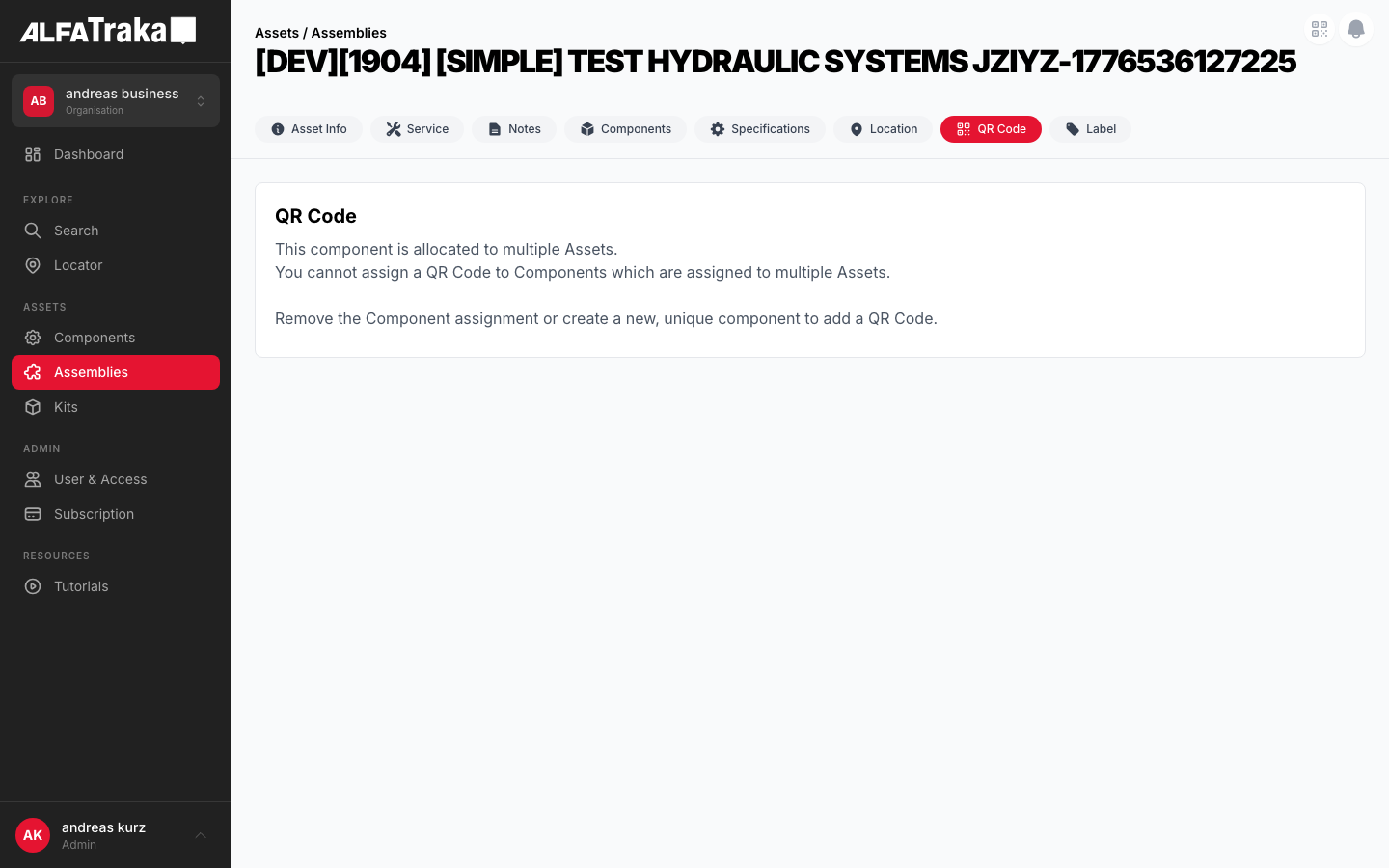
Web — current implementation
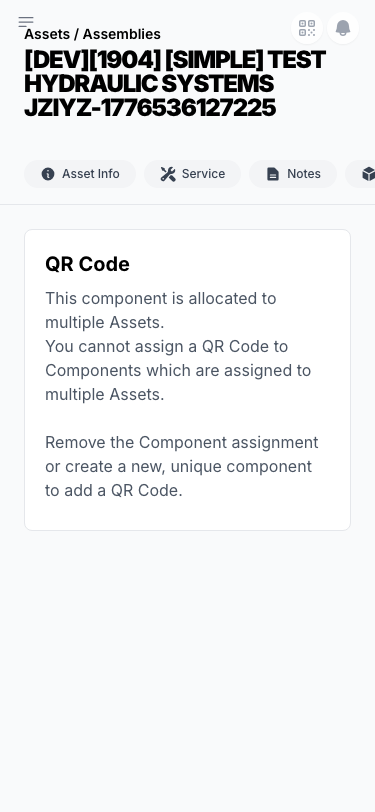
Mobile — current implementation
2. Component Tree
Web (Next.js)
QrCodeTab                            components/qr-code/index.tsx
 |- EmptyState                        components/empty-state/index.tsx
 |   props: icon, title, description, actionLabel, onAction
 |   '- "Add QR Code" button (disabled when !manageQrCodePermission || multiParent)
 |- QROptionModal                     NEW — modal overlay with two options
 |   |- OptionCard: "Auto-generate"   → calls QRCodeService.generate()
 |   '- OptionCard: "Bring your own"  → opens BYOQRFlow
 |- BYOQRFlow                         inside QROptionModal
 |   |- TextInput (qr_number)
 |   |- Toggle: "Enable native camera redirect"
 |   |- ValidateButton → QRCodeService.verify()
 |   |- ValidationBadge (green ✓ / red ✗)
 |   |- QRPreview (rendered QR image when valid)
 |   '- "Add QR Code" button
 |- QRCodeView                        when asset.qr_number exists
 |   |- QR image (centered, w-48 h-48)
 |   |- QR number + subtitle text (custom: "linked by user", AT: URL)
 |   |- DangerZone (red bg, warning text, Delete button)
 |   '- Actions: Download, Print
 |- DeleteConfirmModal                components/confirm-modal/index.tsx
 '- QRCodeService                     @client/shared-layer
     |- .getQrCode(code) → QR image
     |- .verify(code, type, qty, sku, isCustom) → uniqueness check
     |- .update(code, assetId, isManual) → create/update
     '- .delete(assetId)
Mobile (React Native)
QRTab                                components/Assets/components/QRTab/index.tsx
 |- EmptyState                        components/EmptyState/index.tsx
 |   '- "Add QR Code" button → opens ActionSheet
 |- ActionSheet (ModalPopup)          rn-alfagomma-mobile-share-ui/ActionSheet
 |   |- Option: "Auto-generate"       → QRCodeService.update()
 |   '- Option: "Bring your own"      → opens QRInput flow
 |- QRInput                           components/Assets/components/QRInput/index.tsx
 |   |- TextInput + "Scan QR" button
 |   |- QRScanner (react-native-vision-camera)
 |   |- Toggle: camera redirect
 |   |- Validate → QRCodeService.verify()
 |   '- QR preview (SVG) + "Add QR Code"
 |- QRCodeView                        QR image + DangerZone
 |- ConfirmBottomSheet                components/ConfirmBottomSheet/index.tsx
 '- QRCodeService                     @mobile/shared-layer
3. Design Tokens
| Element | Tailwind / RN Style |
|---|---|
| Empty state container | flex flex-col items-center justify-center p-12 text-center |
| Empty state icon | h-12 w-12 text-gray-300 (web) · h-16 w-16 (mobile) |
| Modal overlay (web) | fixed inset-0 z-50 bg-black/50 flex items-center justify-center |
| Modal card (web) | w-full max-w-md rounded-xl bg-white p-6 shadow-xl |
| Option card | flex items-center gap-4 p-4 rounded-lg border border-gray-200 hover:bg-gray-50 cursor-pointer |
| Option icon circle | w-10 h-10 rounded-full bg-gray-100 flex items-center justify-center |
| Toggle switch | relative inline-flex h-6 w-11 rounded-full (off: bg-gray-200, on: bg-ag_red) |
| QR image area | w-48 h-48 bg-white rounded-xl border border-gray-100 shadow-sm |
| Validation badge (valid) | inline-flex items-center gap-1 rounded-full bg-green-50 text-green-700 px-2 py-0.5 text-xs |
| Validation badge (invalid) | inline-flex items-center gap-1 rounded-full bg-red-50 text-red-600 px-2 py-0.5 text-xs |
| Danger zone | rounded-lg border border-red-100 bg-red-50 p-4 |
| Success banner | rounded-lg bg-green-50 border border-green-200 px-4 py-3 text-sm text-green-800 |
| Text input | w-full rounded-lg border border-gray-200 px-3 py-2.5 text-sm focus:border-ag_red focus:ring-1 focus:ring-ag_red |
| Primary button | bg-ag_red hover:bg-ag_red/90 rounded-lg px-4 py-2 text-sm font-medium text-white |
| Delete button | rounded-lg border border-red-300 bg-white px-3 py-1.5 text-sm font-medium text-red-600 hover:bg-red-50 |
| Bottom sheet (mobile) | bg-white rounded-t-2xl shadow-2xl · handle: w-10 h-1 bg-gray-300 rounded-full |
| Scanner viewfinder | Corner brackets: border-4 border-white w-10 h-10 · Scan line: h-0.5 bg-ag_red/80 |
| ⛔ NEVER on cards | border-l-* colored left borders. Use badges for status. |
4. Data Fields
| Field | Type | Source | Notes |
|---|---|---|---|
| qr_number | string | asset.qr_number | Null when no QR assigned |
| qr_type | 'custom' | 'at-generated' | Inferred from creation method | Custom = BYOQR, AT-generated = auto |
| qr_image | string (URL) | QRCodeService.getQrCode() | Server-rendered QR image |
| is_valid | boolean | null | QRCodeService.verify() | null = not yet validated |
| enable_camera_redirect | boolean | User toggle | Prepends redirect host URL to QR value |
| quantity | number | Create Asset wizard | Determines single vs multi-QR flow |
| custom_qr_numbers | Record<index, code> | Formik state | Only for qty > 1 create flow |
| assigned_to | string[] | asset.assigned_to | If length > 1, QR add is blocked |
5. Permissions
| Action | RIGHTKEY | Condition |
|---|---|---|
| View QR tab | — | Always visible |
| Add QR Code | Manage{AssetType}QrCode | No existing QR + assigned_to.length ≤ 1 |
| Auto-generate QR | Manage{AssetType}QrCode | Same as Add |
| Bring own QR | Manage{AssetType}QrCode | Same as Add |
| Delete QR | Manage{AssetType}QrCode | Existing QR + confirmation modal |
| Print / Download | — | QR image exists |
asset.assigned_to.length > 1, the "Add QR Code" button is disabled with a warning message. QR codes can only be assigned to assets with one or no parent.
6. Variants
Standard empty state (icon + title + subtitle + Add button). When no permission: Add button and subtitle are hidden — user only sees empty state. When multi-parent: button and subtitle hidden, yellow info box shown instead. Three sub-variants: has permission, no permission, multi-parent blocked.
Modal bottom sheet with two options: "Auto-generate QR Code" and "Bring your own QR Code". Styled like the asset edit context menu.
Text input + Validate + preview. States: empty input, validated (green check + QR preview), failed (red X + error message). Multi-asset (qty>1): table of QR codes with per-index validation.
One-click generation. Single asset: immediately creates and shows QR view. Multi-asset (qty>1): generates all codes at once and shows table.
Centered QR image + number + subtitle. DangerZone section with delete warning. Custom vs AT-generated have different warning text. No badges — type is implied by the subtitle text.
Confirmation modal/bottom sheet with warning text. On confirm: delete QR and return to empty state.
7. Status
8. Web Interactive Mockups
13 variants covering empty states, add flows (option sheet, BYOQR, auto-generate), view states, and delete confirmation. Click tabs to switch.
No QR Code
Add a QR Code to easily identify individual assets with your camera.
User has Manage{AssetType}QrCode permission and asset has ≤1 parent. Clicking "Add QR Code" opens the option sheet modal.
No QR Code
No QR Code has been assigned to this asset.
User lacks Manage{AssetType}QrCode permission. Add button is hidden entirely — user only sees the empty state without any call to action.
No QR Code
Asset has assigned_to.length > 1. Only the info box is shown — Add button and subtitle are hidden.
Add QR Code
ALFATRAKA fully unleashes its magic if you tag your assets with a QR Code. We support both, Bring Your Own QR Code or let AlfaTraka create one for you.
Auto-generate QR Code
Let AlfaTraka create a unique QR code for this asset.
Bring your own QR Code
Type or scan an existing QR code to link it to this asset.
Modal overlay with two option cards. Same visual pattern as the asset edit context menu. "Auto-generate" creates immediately; "Bring your own" opens the BYOQR flow.
Bring Your Own QR Code
Please scan your QR Code or type the QR Code manually.
Enable native camera redirect
Prepends AlfaTraka redirect URL to QR value
BYOQR flow — input is empty. "Validate" button disabled until user enters a QR code value. Back arrow returns to option sheet.
Bring Your Own QR Code
Great! This QR Code is good to go!
Enable native camera redirect
Prepends AlfaTraka redirect URL to QR value
QR validated successfully — green border on input, "Valid" badge, QR preview rendered. "Add QR Code" button is now enabled.
Bring Your Own QR Code
Please use another QR Code and try again.
This QR code is already in use by another asset.
Validation failed — red border, "Invalid" badge, error message. User must clear input and try a different QR code.
Bring Your Own QR Code
qty: 3Assign a QR code to each asset. Validate each code individually.
QR Codes
| # | QR Code | Status |
|---|---|---|
| 1 | QR-2024-08471 | ✓ |
| 2 | QR-2024-08472 | ✗ |
| 3 | — |
Row 2: QR-2024-08472 is already in use.
QR-2024-08471
Asset #1 of 3
Create Asset workflow, quantity = 3. Table shows per-asset QR codes with validation. Row 1 selected (highlighted). Button disabled until all valid. "Apply pattern to all" toggle applies base code with incrementing suffix.
QR-2024-08471
https://app.alfatraka.com/qr/QR-2024-08471
Auto-generate clicked — QR created immediately. Success banner shown. This transitions to the View state (with Danger Zone below fold).
| # | QR Code | QR Number | Status |
|---|---|---|---|
| 1 | https://app.alfatraka.com/qr/QR-2024-08471 | QR-2024-08471 | ✓ |
| 2 | https://app.alfatraka.com/qr/QR-2024-08472 | QR-2024-08472 | ✓ |
| 3 | https://app.alfatraka.com/qr/QR-2024-08473 | QR-2024-08473 | ✓ |
Create Asset wizard, quantity = 3. All QR codes auto-generated. "Finalize" creates all assets with assigned QR codes and redirects to the last created asset detail.
MY-CUSTOM-QR-001
Custom QR code linked by user
Danger Zone
Deleting the QR Code means scanning the current label will no longer resolve to this asset.
Existing custom (BYOQR) QR code. Danger Zone with delete option. No edit — user must delete and recreate to change.
QR-2024-08471
https://app.alfatraka.com/qr/QR-2024-08471
Danger Zone
This QR Code was created by AlfaTraka and cannot be edited. If you want to use a custom QR Code, you need to delete this code first and create a new one via the Bring Your Own QR Code workflow.
Deleting the QR Code means scanning the current label will no longer resolve to this asset.
AT-Generated QR code. Extended warning in Danger Zone: cannot be edited, must delete and recreate with BYOQR.
Delete QR Code?
This action cannot be undone. The physical label will no longer resolve to this asset when scanned.
Delete confirmation modal. Red icon, warning text. On confirm: QR deleted, user returns to empty state. On cancel: modal closes.
9. Mobile Interactive Mockups (React Native)
13 variants covering the same flows as web, adapted for mobile with bottom sheets, camera scanner, and touch-optimized layouts.
Assemblies
2" Gate Valve
No QR Code
Add a QR Code to easily identify individual assets with your camera.
Standard empty state matching Notes/Location pattern. Tapping "Add QR Code" opens the option bottom sheet.
Components
Valve Body
No QR Code
Multi-parent: info box shown, Add button and subtitle hidden. No permission: same pattern — empty state with no call to action.
Assemblies
2" Gate Valve
Add QR Code
Tag your asset with a QR Code. Scan it later with your camera to instantly find this asset.
Auto-generate QR Code
Let AlfaTraka create a unique QR code for this asset.
Bring your own QR Code
Scan or type an existing QR code to link it.
Bottom sheet with two option cards (ActionSheet pattern). "Auto-generate" creates immediately; "Bring your own" transitions to BYOQR input.
2" Gate Valve
Bring Your Own QR Code
Please scan your QR Code or type it manually.
Camera redirect
Add AlfaTraka redirect URL
BYOQR input with camera scan button (mobile-only). Validate disabled until input has value. Back arrow returns to option sheet.
Scan QR Code
Point camera at QR code
Position the QR code within the frame to scan
Full-screen camera viewfinder using react-native-vision-camera. Corner brackets, ag_red scan line. Scanned QR value is passed back to the input field.
2" Gate Valve
Bring Your Own QR Code
Great! This QR Code is good to go!
QR validated. Green border, check badge, QR preview. "Add QR Code" button enabled.
2" Gate Valve
Bring Your Own QR Code
Please use another QR Code and try again.
This QR code is already in use by another asset.
Validation failed. Red border, X badge, error message. User must clear and try another code.
Create Component (qty: 3)
Bring Your Own QR Code
qty: 3Assign a QR code to each asset.
#2: QR-2024-08472 is already in use.
Create Asset flow, quantity = 3. Per-row QR input with validation status. Row 1 selected (highlighted). Button disabled until all valid.
Assemblies
2" Gate Valve
QR-2024-08471
GeneratedAuto-generate success. QR created and assigned immediately. Transitions to QR view with success banner.
Create Component (qty: 3)
QR-2024-08471
✓QR-2024-08472
✓QR-2024-08473
✓Create Asset, qty = 3. All auto-generated. "Finalize" creates assets with QR codes and navigates to last created asset.
Assemblies
2" Gate Valve
MY-CUSTOM-QR-001
Custom QR code linked by user
Danger Zone
Deleting this QR Code means scanning the label will no longer resolve to this asset.
Existing custom QR code. Danger Zone with full-width delete button.
Assemblies
2" Gate Valve
QR-2024-08471
https://app.alfatraka.com/qr/QR-2024-08471
Danger Zone
This QR Code was created by AlfaTraka and cannot be edited. To use a custom QR Code, delete this one first.
Deleting means the label will no longer resolve to this asset.
AT-Generated QR. Extended danger zone warning: cannot edit, must delete and recreate via BYOQR.
2" Gate Valve
Delete QR Code?
This cannot be undone. The physical label will no longer resolve to this asset.
ConfirmBottomSheet pattern. Red trash icon, warning text. Cancel dismisses; Delete removes QR and returns to empty state.